How to export Reddit comments to CSV — without losing the thread.
There are three serious ways to get a Reddit thread into a spreadsheet in 2026. Two of them are slow or technical. One is a single click. Here is the honest comparison, with the actual columns and edge cases that matter.
A Reddit thread is not a list. It is a tree — comments reply to comments reply to comments — and any tool that flattens that tree into a CSV without preserving depth has destroyed half the data. That single distinction separates the actual options below.
This guide covers three approaches: the Chrome extension we built (Reddit Comment Exporter), the official Reddit API via PRAW, and the brute-force copy-paste approach. We’ll cover when each makes sense, what columns you should ask for, and how to handle the awkward parts of Reddit (collapsed threads, deleted users, AMA structure, deeply nested replies).
The three ways to get Reddit comments into a CSV
1. A Chrome extension (~10 seconds, no setup)
The fastest path. You install the extension, open the Reddit thread in your browser, and click Extract. The extension reads the comments your browser is already loading — including the ones hidden behind “1.4k more replies” buttons — and turns them into a CSV with one click. No API key, no Python, no environment variables.
This is the approach we built, so we’re obviously biased. But the reason we built it is that nothing else combined three things at once: hierarchy preservation, one-click CSV, and zero setup. If you want those three things and don’t already have a Python environment ready to go, this is the only honest answer. The broader pitch lives on the Reddit thread exporter and comment scraper page; if all you want is to save a Reddit thread before it disappears, that has its own walk-through.
 Reddit Comment Exporter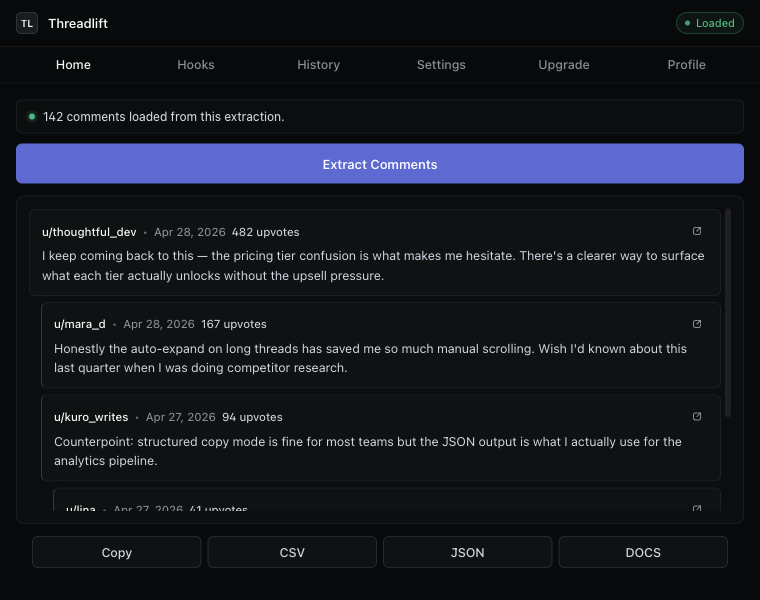
2. The Reddit API (via PRAW or HTTP)
This is the “correct” developer answer. Reddit publishes a JSON API; PRAW is the most-used Python wrapper. You sign up for a developer account at reddit.com/prefs/apps, register an OAuth application, get a client ID and secret, and authenticate.
It works. It is also noticeably more annoying than people remember. Since the 2023 pricing change, large requests are metered (about $0.24 per 1,000 calls past the free tier), and the comment-tree pagination is famously irritating — MoreComments placeholders that you have to expand recursively, rate limits that surprise you on long AMAs, and no built-in way to get a flat “every comment in this thread” list without writing the recursion yourself.
import praw

reddit = praw.Reddit(
  client_id="your_client_id",
  client_secret="your_secret",
  user_agent="my-app/0.1 by /u/me",
)

submission = reddit.submission(url="https://reddit.com/r/SaaS/comments/...")
submission.comments.replace_more(limit=None)  # this is the slow part

import csv
with open("thread.csv", "w") as f:
  w = csv.writer(f)
  w.writerow(["id", "parent_id", "author", "score", "body", "permalink"])
  for c in submission.comments.list():
    w.writerow([c.id, c.parent_id, str(c.author), c.score, c.body, c.permalink])
Use this if you’re building a pipeline. Skip it if you just want the spreadsheet.
3. Copy-paste (don’t)
For threads under ten comments, you can highlight, copy, paste into Google Sheets, and clean up by hand. For anything larger this falls apart immediately: indentation collapses, scores disappear, deleted users show as “[deleted]” with no way to know who they were replying to, and you spend more time fixing the file than reading the thread you wanted to read in the first place.
The CSV columns you actually want
Most tools give you the wrong columns by default. After extracting thousands of threads we settled on this set, with everything optional via toggle:
- id — Reddit’s unique comment id. Lets you join back to other tools.
- parentId — the comment’s direct parent. Without this you cannot reconstruct the thread.
- depth — integer, root comments = 0. Lets you indent in any spreadsheet view.
- author — username, or
[deleted]. - body — the comment text. Markdown preserved.
- score — Reddit’s upvote/downvote net.
- createdAt — ISO-8601 timestamp.
- permalink — full URL back to that specific comment.
- postTitle / postAuthor / postUrl / subreddit — context columns, off by default for compactness.
The single most-skipped column is parentId. If you ever want to do anything with the thread structure later — analyze who replied to whom, build a network graph, find the most-replied-to comments — you need it. It costs you a column and saves you a re-extract.
Preserving hierarchy in a flat file
A CSV is by definition flat, which seems like a problem for tree-shaped data. The trick is two columns: parentId tells you the structure, depth tells you the visual indent. Together they let you render the tree from a flat sheet in any tool — Sheets, Excel, Pandas, Airtable, even pen and paper.
If you’d rather skip rendering the tree yourself, the structured copy mode in the extension formats the transcript with indentation by depth and includes the score and timestamp inline:
Comment 1 — u/jellybean42 · 312 points · 2026-04-12
  How did you find your first paying customer?
  → Comment 2 — u/founderdiary · 287 points · 2026-04-12
    Built it for a friend who needed it. They paid me $50 to keep using it.
    → Comment 3 — u/marketingmoth · 56 points · 2026-04-12
      This is the boring answer that always works.
The edge cases nobody tells you about
Collapsed “more replies”
Reddit hides batches of replies behind clickable placeholders. The web UI shows them only when you click. Most scrapers stop here. Our extractor calls Reddit’s morechildren endpoint to resolve them, which means an AMA with twelve thousand comments comes out the way you expect, not as the top three hundred.
Deleted users and removed comments
When a user deletes their account or a moderator removes a comment, Reddit replaces the body with [deleted] or [removed]. The replies underneath are still there. Flatten naively and you’ll lose the thread structure for every reply chain that touches a deleted node. Use parentId to keep them attached.
AMAs and pinned comments
AMAs have a distinct structure: the OP’s comments tend to be the leaves you actually want. Filter by author == OP after export to get the AMA Q&A in isolation. Most tools don’t mark this; we expose postAuthor in the post-context columns so you can do the join in one step.
Old vs. new Reddit
If you’re on old.reddit.com the extension still works — same extraction, same output. We test both UIs on every release.
Are scraping Reddit comments allowed?
Reading public comments through a browser you’re logged into is allowed. Reddit’s ToS forbids commercial bulk-scraping at scale and forbids redistributing user content without permission. For research, journalism, marketing analysis, and personal use, you’re fine. If you’re building a public dataset or selling extracted Reddit data, you need to use the official API and abide by its commercial terms.
Ready in ten seconds
The Chrome extension is free, no account required, and works on any thread. Open one, click Extract, click CSV. That’s the whole workflow. Need a different output format? The same one-click flow handles Reddit-to-JSON exports, Reddit-to-Excel (.xlsx), Reddit-to-Google-Sheets, and Reddit-to-Google-Docs (Plus).
Keep reading
Download · Save
Download Reddit comments to your disk
Save every comment from a thread before it disappears — CSV, JSON, Markdown, or a Google Doc.
Thread exporter
A Reddit thread exporter for the next thread you open
Comment scraper that runs in your browser. No API key, no OAuth, hierarchy intact, “more replies” auto-expanded.
Reddit → Excel
Export a Reddit thread to Excel
A CSV that opens cleanly in Excel — UTF-8 with BOM, ISO timestamps, no encoding fights.
Stop copying comments by hand
Install once. Export forever.
A free Chrome extension built for one platform. Add it on the next thread you open.