A Reddit thread, in your Drive, in one click.
The reason most people stop at CSV is that the next step — turning a thread into something a teammate can read — is annoying. Pasting into a doc loses formatting. Saving as Word loses hyperlinks. The Plus tier’s Google Docs export is the missing one-click step.
There’s a particular friction tax for people who do their work in Google Docs and need Reddit threads to live there with everything else. CSV is great for analysis, JSON is great for code, neither of them is what you paste into a research brief that other humans need to read. The Docs export exists for that, and only that.
How the Docs export works
- Extract a Reddit thread (Plus removes the Free tier’s 20-comment cap).
- Sign in with Google in the Profile tab (one-time; uses the standard Google OAuth flow).
- Click the Docs button in the export footer.
- A new Google Doc opens in a tab, in your Drive, with the thread already pasted and formatted.
That’s it. There’s no separate web app to log into, no “sync your library,” no manual import.
What the document actually looks like
The Doc preserves the thread structure as readable text, not as raw data:
- Post title as the document title (H1).
- Post body in a quoted block underneath.
- Comments in document order with depth-based indentation, author, score, and the timestamp inline.
- Permalinks as hyperlinks on the comment number — click to jump back to the source.
- Subreddit, post URL, and extraction date in the document footer for citation.
You can edit it like any other Doc. Share it like any other Doc. Comment on it, suggest changes, send it for review. It is a Google Doc.
 Reddit Comment Exporter — Docs export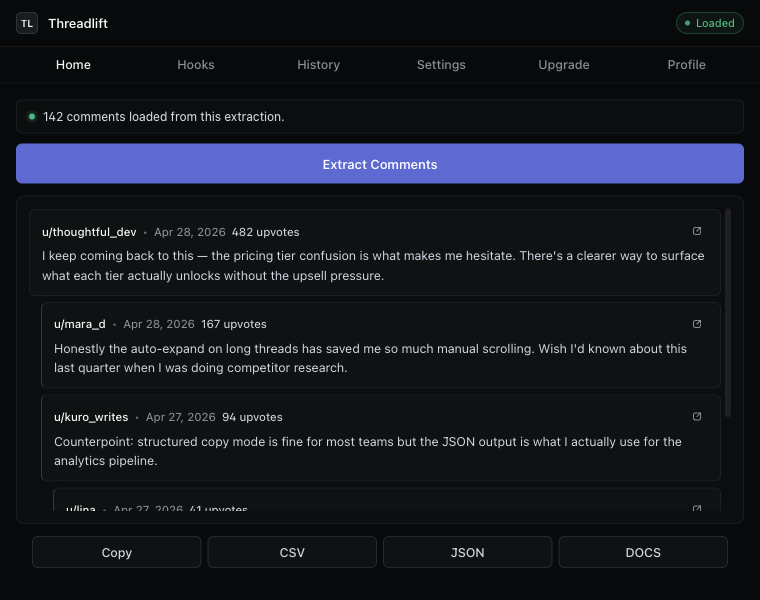
When this beats CSV
Exporting Reddit comments to CSV is for analysis. Docs is for distribution. The two use cases barely overlap:
- You need to share a thread with someone who isn’t technical. CSV makes them squint. Docs reads like a transcript.
- You want to annotate as you read. Docs comments and suggestions work; CSV doesn’t.
- You’re including the thread in a brief or report. Paste from Doc into Doc preserves formatting; paste from CSV doesn’t.
- You want to search later. Drive search indexes Docs. Local CSV files require
grep.
What permissions Google asks for, and why
The Drive permission scope we request is the minimum that lets us create new Docs in your Drive. Specifically: drive.file — which only grants access to files this app creates, not your existing Drive. We can’t see anything else in your Drive, and nothing in your Drive ever leaves your Google account.
Google’s consent screen will show this exact scope when you connect. If you ever want to revoke, you do it from myaccount.google.com/permissions like any other connected app.
Pricing
Google Docs export is a Plus feature. The full pricing — Free is capped at 20 comments per thread, Plus is $4.99/mo with unlimited extraction and Docs export, Pro is $12.99/mo with the full research suite on top (history, Hooks, AI angles, API access) — is on the pricing page. We didn’t put Docs in Free because connecting a third-party Drive scope and maintaining a server-side endpoint to write the Doc has real costs; charging $0 for it would make the math wrong.
If you don’t want Plus
You can do the same thing manually. Use the Copy button (Free), choose structured mode, paste into a new Google Doc. The formatting will mostly survive. You lose the auto-titled Doc and the permalink hyperlinks, but you get most of the way there. If that’s your once-a-week move, save your $4.99.
If you’re doing it weekly and the manual paste is the friction that makes you skip it: that’s exactly who Plus is for.
Keep reading
Download · Save
Download Reddit comments to your disk
Save every comment from a thread before it disappears — CSV, JSON, Markdown, or a Google Doc.
Thread exporter
A Reddit thread exporter for the next thread you open
Comment scraper that runs in your browser. No API key, no OAuth, hierarchy intact, “more replies” auto-expanded.
How-to
Export Reddit comments to CSV
The cleanest way to get a Reddit thread into a spreadsheet — with hierarchy intact.
Stop copying comments by hand
Install once. Export forever.
A free Chrome extension built for one platform. Add it on the next thread you open.