Download every comment from a Reddit thread, in one click.
The default Reddit UI is great for reading and terrible for keeping. There’s no “save this thread” button. Bookmarks don’t survive deletions. Screenshots lose the structure. Copy-paste destroys the indentation. Here is the actually-useful pattern.
There is a small category of internet artifacts you want to keep — a thread that finally answered a question you’d been circling for months, an AMA that won’t age well, a long support discussion that the OP might delete next week. Reddit, by design, does not help you keep them. So you need a tool that does.
What “download a Reddit thread” actually means
Three different things, depending on what you’re going to do next:
- Save the comments to your disk as data — a CSV or JSON file with every comment, depth, score, author, and permalink. For analysis, archiving, or feeding into another tool.
- Save the thread as a readable document — a Google Doc, a Markdown file, or a Word-style export with the conversation laid out in a way a human can read in order.
- Save the thread as a snapshot — a record of what the thread looked like the day you read it, with timestamps, scores, and permalinks frozen so it can’t silently change later.
The Reddit Comment Exporter Chrome extension does all three. You install it once. You open any Reddit thread. You click one button. Eight seconds later the file is on your disk or in your Drive.
 Reddit Comment Exporter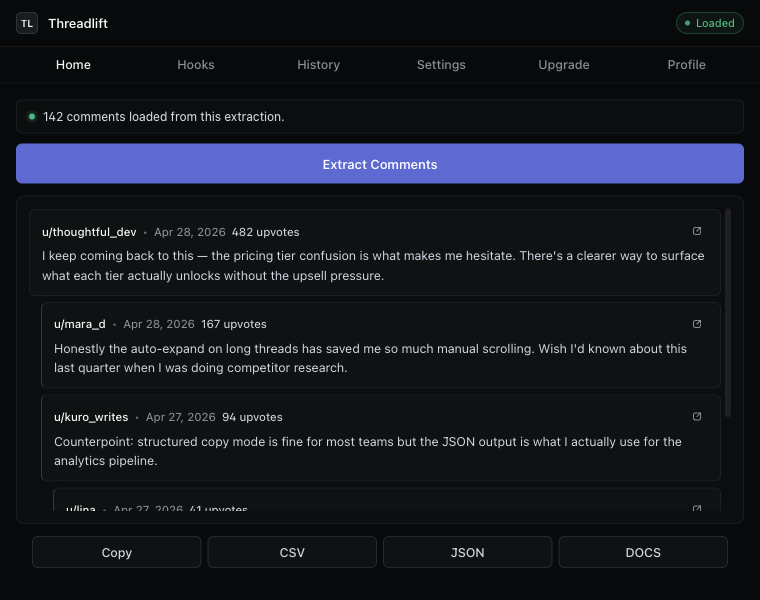
Which format you want, and why
CSV — for spreadsheets and analysis
Open in Sheets, Excel, Numbers, Pandas, NVivo, or anything else that reads tabular data. Hierarchy is preserved via the parentId and depth columns. See the full guide on exporting Reddit comments to CSV for the column-by-column breakdown.
JSON — for code and structured analysis
Same fields as CSV, plus the nested reply tree as an array of children — easier to iterate over in Python, JavaScript, or any structured-data tool. See Reddit to JSON export.
Excel (.xlsx) — for non-technical teammates
If the person you’re handing the file to lives in Excel, save the Reddit thread as an Excel spreadsheet with formatting that survives the open.
Google Sheets / Google Docs — for collaborators
Drop the thread straight into Drive. Reddit-to-Google-Sheets for analysis with shareable formulas. Reddit-to-Google-Docs (Plus) for a formatted, human-readable transcript.
Markdown — for notes and LLMs
The Markdown copy mode produces a clean transcript you can paste into Obsidian, Notion, a wiki, or an LLM prompt. Indentation by depth survives the paste, permalinks come through as links.
Saving vs. backing up vs. archiving
The three words get used interchangeably; they mean different things in practice.
- Save — “I want this thread on my disk so I can read it offline or paste from it tomorrow.” Any export format works.
- Back up — “If the OP deletes this in two weeks, I still want it.” Export to CSV or JSON; the deleted state of any single comment is captured in the file, not lost.
- Archive — “I want a verifiable snapshot for a citation or a methods section.” Use the CSV with the provenance columns (
extractedAt,extractionSource, full permalinks). The Reddit research tool guide covers this workflow.
What happens when comments are deleted later
Once you’ve downloaded a thread, the file on your disk is independent of Reddit. If the OP deletes the post, your CSV still has every comment. If a user deletes their account, your file still has the comment body as it existed at the moment of extraction. Reddit can change. The file cannot.
This is the most under-appreciated reason to download a thread you care about. Public Reddit threads are mutable. They get edited silently, they get nuked entirely, and they get archived with most of the change already done. Eight seconds of friction now saves the “I should have saved that” regret later.
How many comments you can download
Free tier handles the first 20 comments of any thread — enough to confirm the extractor works on a thread you care about, not enough for a real AMA. Plus removes the cap entirely: 2,000 comments, 12,000 comments, any thread. The extension auto-expands every “more replies” batch, including the deeply nested ones most tools silently skip. For the pricing, see the three-tier pricing page.
Is it allowed?
Downloading public Reddit comments through a browser you’re logged into, for personal use, research, journalism, or marketing analysis, is fine. Reddit’s Terms forbid commercial bulk scraping at scale and forbid redistributing user content without permission. If you’re building a public dataset or selling Reddit data, you need the official API and its commercial terms. For one-human-reading-one-thread, you’re inside the line.
Keep reading
Thread exporter
A Reddit thread exporter for the next thread you open
Comment scraper that runs in your browser. No API key, no OAuth, hierarchy intact, “more replies” auto-expanded.
How-to
Export Reddit comments to CSV
The cleanest way to get a Reddit thread into a spreadsheet — with hierarchy intact.
Reddit → Excel
Export a Reddit thread to Excel
A CSV that opens cleanly in Excel — UTF-8 with BOM, ISO timestamps, no encoding fights.
Stop copying comments by hand
Install once. Export forever.
A free Chrome extension built for one platform. Add it on the next thread you open.