Reddit threads, in Excel, in one click.
Most people who say “export to Excel” mean: I want a row per comment, with the columns I’d expect, opening cleanly in Excel without a UTF-8 dance. That’s a small ask that almost no tool actually fixes. Here’s the one that does.
The historical problem with “Reddit to Excel” is character encoding. Reddit comments contain emoji, em-dashes, smart quotes, and the occasional comment in Cyrillic or Japanese. Excel on Windows famously mangles UTF-8 CSV files unless the file starts with the right byte-order-mark. Half the tools you find on the open web don’t handle this. The result is a spreadsheet full of black diamonds where the punctuation used to be.
How to export a Reddit thread to Excel
- Install the Reddit Comment Exporter Chrome extension.
- Open the Reddit thread you want in Excel.
- Click Extract. Watch the live counter.
- Click CSV to download.
- Double-click the file. Excel opens it. Done.
 Reddit Comment Exporter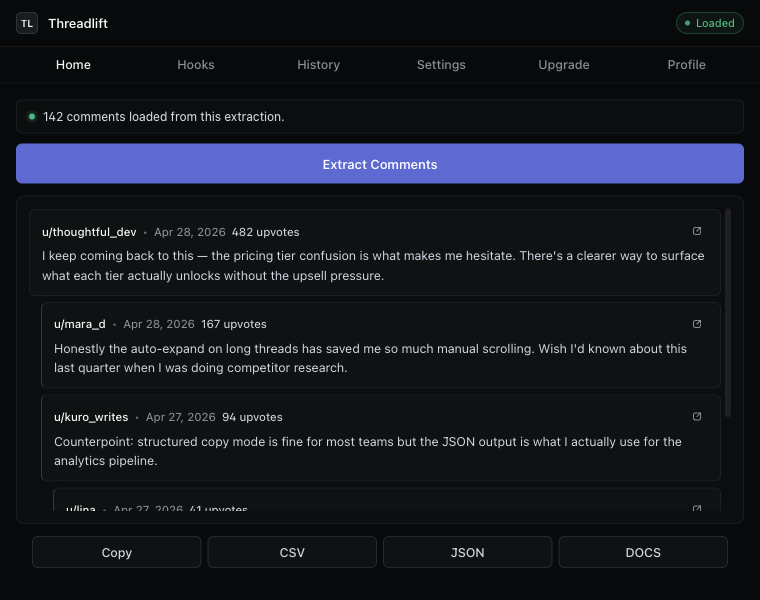
The columns you’ll see in Excel
- id — Reddit’s unique comment id. Lets you join back to other tools.
- parentId — the comment’s direct parent. Without this you cannot reconstruct the thread.
- depth — integer, root comments = 0. Use in Excel for indentation or for filtering top-level comments only.
- author — Reddit username, or
[deleted]. - body — the comment text. Quoted so it survives commas, newlines, and pasted code blocks.
- score — net upvotes at the moment of extraction.
- createdAt — ISO-8601 timestamp Excel can parse with
=DATEVALUE(). - permalink — full URL back to that specific comment. Excel auto-hyperlinks these.
For the full column-by-column breakdown including optional post-context columns, see the CSV export guide.
Three Excel patterns we see on Reddit data
Pivot by author, sum by score
Highlight the table, insert a PivotTable, drop author into rows and score into values (sum). You now have a leaderboard of who carried the thread. Surprisingly useful for AMAs — the people you’d expect to dominate often don’t.
Filter to top-level comments only
Add an AutoFilter on depth, set to 0. Now you’re reading just the root comments — the actual “first-take” reactions, without the back-and-forth threading. Sort by score descending.
Build a reply graph
The parentId column is everything you need to render the tree. Use VLOOKUP from parentId back to id to pull the parent comment alongside each child. Now each row carries its own context.
Why this opens cleanly in Excel
Three small details the extension gets right that broken tools don’t:
- UTF-8 with BOM. The CSV file starts with the byte-order-mark Excel needs to recognize the file as UTF-8 without the user changing import settings.
- RFC 4180 quoting. Comment bodies are wrapped in double quotes, with embedded quotes doubled. Newlines inside comments don’t break the row.
- ISO timestamps, not Reddit’s Unix integers. You get
2026-04-12T14:33:02Z, not1744470782. Excel parses ISO natively; nobody wants to write a=DATE()formula to convert a Unix epoch.
If Excel isn’t actually the right tool
Excel is great for analysis, fine for sharing if your audience is in the spreadsheet world, and bad for handing a thread to a non-technical reader. If you want the latter, use Reddit to Google Docs instead. If you want a structured-data format for a script, use Reddit to JSON. If you want to collaborate on the file with comments and formulas, Reddit to Google Sheets is the cleaner path. For the full overview of how to download Reddit comments in every format, see the landing page.
Keep reading
Download · Save
Download Reddit comments to your disk
Save every comment from a thread before it disappears — CSV, JSON, Markdown, or a Google Doc.
Thread exporter
A Reddit thread exporter for the next thread you open
Comment scraper that runs in your browser. No API key, no OAuth, hierarchy intact, “more replies” auto-expanded.
How-to
Export Reddit comments to CSV
The cleanest way to get a Reddit thread into a spreadsheet — with hierarchy intact.
Stop copying comments by hand
Install once. Export forever.
A free Chrome extension built for one platform. Add it on the next thread you open.