Reddit threads, in Google Sheets, in under a minute.
The cleanest path from a Reddit thread to a Google Sheet is a small two-step: download the CSV from the extension, import it into a fresh Sheet. The whole flow takes about sixty seconds, and you end up with a tab you can pivot, filter, share, and formula on.
Google Sheets is where most non-engineering analysis actually happens. It’s collaborative, it’s free, and it’s the file format your stakeholders already know how to read. The friction of getting Reddit data into a Sheet has been the part nobody enjoyed. This is the path that doesn’t require a developer.
How to get a Reddit thread into Google Sheets
- Install the Reddit Comment Exporter Chrome extension.
- Open the Reddit thread you want.
- Click Extract, then click CSV. The file lands in your Downloads folder.
- In Google Sheets, open a new Sheet → File → Import → upload the CSV → choose Replace current sheet.
- Done. Every comment is now a row.
The whole sequence is about sixty seconds for a typical thread. The slowest step is choosing the file in the import dialog.
 Reddit Comment Exporter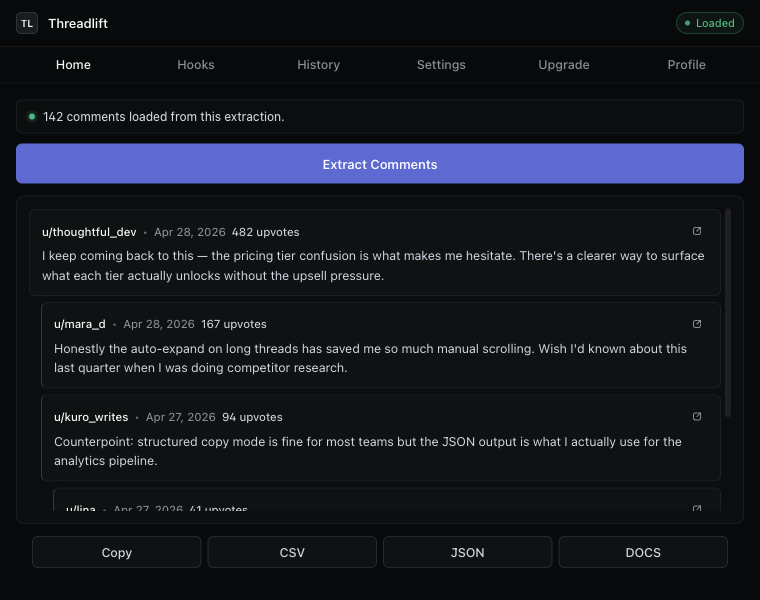
The columns you get
- id — Reddit’s unique comment identifier.
- parentId — the direct parent, for reconstructing the reply tree.
- depth — root comments = 0. Filter on this for top-level replies only.
- author — Reddit username, or
[deleted]. - body — comment text. Quoted so it survives commas and newlines.
- score — upvote net at extraction time.
- createdAt — ISO-8601 timestamp Sheets recognizes as a date.
- permalink — full URL to the specific comment. Sheets auto-hyperlinks.
See the CSV export guide for the column-by-column rationale.
Three Google Sheets patterns for Reddit data
Pivot by author, sort by total score
Insert → Pivot table. author in rows, score in values (SUM). Sort descending. The names at the top are the people who actually shaped the thread — useful for AMAs, customer-research subreddits, and any thread where the top comment isn’t the whole story.
Top-level comments only
Apply a filter on depth = 0. You’re now reading just the root comments — the first-take reactions, without the back-and-forth. Sort by score descending for the most-resonated openings.
Reconstruct the reply chain
Add a column with =VLOOKUP(B2, A:E, 4, FALSE) (replacing column letters as needed). You now have every comment row carrying the parent’s body alongside it — perfect for reading reply pairs in isolation.
Sharing the Sheet
The whole point of using Sheets instead of Excel is collaboration. Once the CSV is in a Sheet, the standard Drive sharing applies: view-only links, comment access, suggesting edits. The permalink column means anyone you share with can click straight back to the source comment on Reddit, no separate URL list needed.
When Google Sheets isn’t the right answer
Sheets is great for analysis and collaboration. It’s the wrong tool for a few cases:
- Handing the thread to a non-analytical reader. A Sheet with 1,200 rows is intimidating. Export to a Google Doc instead — the conversation laid out top to bottom.
- Loading into a script or notebook. Use JSON; the tree is preserved.
- Working offline or in Excel. The same CSV opens cleanly in Excel.
For the full download Reddit comments overview across every format, see the landing page.
Keep reading
Download · Save
Download Reddit comments to your disk
Save every comment from a thread before it disappears — CSV, JSON, Markdown, or a Google Doc.
Thread exporter
A Reddit thread exporter for the next thread you open
Comment scraper that runs in your browser. No API key, no OAuth, hierarchy intact, “more replies” auto-expanded.
How-to
Export Reddit comments to CSV
The cleanest way to get a Reddit thread into a spreadsheet — with hierarchy intact.
Stop copying comments by hand
Install once. Export forever.
A free Chrome extension built for one platform. Add it on the next thread you open.