How to save Reddit comments — without losing them later.
Reddit’s built-in Save button is the most-clicked-and-least-useful feature on the site. It saves the comment in a way that disappears the moment the comment does. Here are the four ways people actually try to save Reddit content, and the one that survives.
The frustration is universal and a little funny: you find a 600-word Reddit comment that answers a question you’ve been chasing for months, you hit Save, you come back two months later, and the comment body says [deleted]. Your save survived. The thing you saved didn’t. The Reddit Save button is not a save — it’s a bookmark that breaks.
The four ways people try to save Reddit comments
1. The in-app Save button (broken by design)
Click the “save” option under a comment. The comment is added to your saved list at reddit.com/user/you/saved. Sounds fine; isn’t. Three problems:
- If the comment is deleted, your saved entry shows
[deleted]with no recovery. - If the OP nukes the post, the whole thread context disappears.
- If Reddit changes archive behavior, you have no copy of your own.
It’s a bookmark, not a save. Use it for bookmarking comments you’ll re-read this week. Don’t use it for anything you’d be upset to lose.
2. Screenshots (lose searchability)
The most common fallback. A screenshot survives deletion. It also loses every useful affordance: you can’t search the text, you can’t click the permalinks, you can’t paste a quote, you can’t carry the score or timestamp. For a single funny comment, a screenshot is fine. For anything you’ll need to reference, it’s a dead end.
3. Copy-paste (loses structure)
Highlight, copy, paste into a doc. For an isolated single comment this works. For a thread you wanted to preserve, it falls apart immediately: indentation collapses, scores disappear, deleted users show as [deleted] with no way to know who they were replying to. Past ten comments you spend more time fixing the file than reading the thread.
4. Export the whole thread (the answer)
Install a Reddit thread exporter, click one button, get the whole thread on your disk as a file. Every comment, every reply, every score, every permalink. Once the file is on your machine, Reddit can delete whatever it wants — your copy is unaffected.
 Reddit Comment Exporter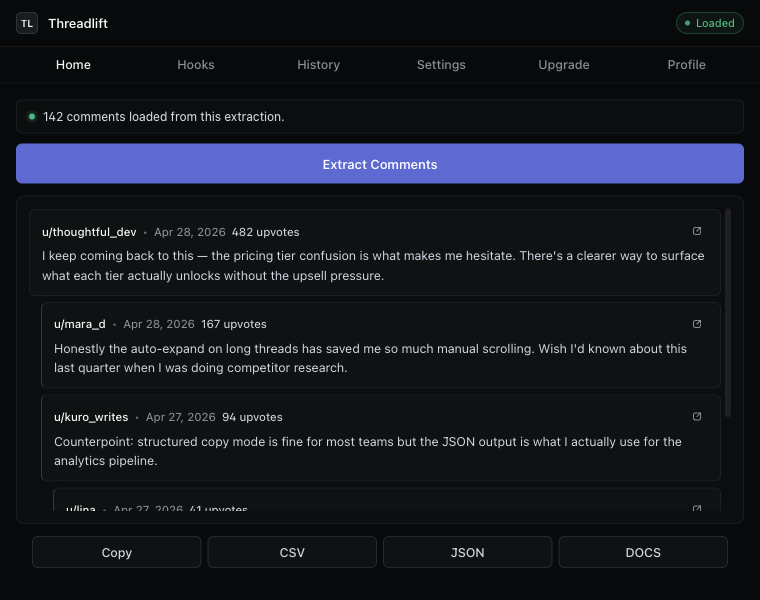
Saving a thread, end to end
- Install the Reddit Comment Exporter Chrome extension.
- Open the Reddit thread you want to keep.
- Click Extract. The extension auto-expands every collapsed “more replies” batch.
- Click CSV, JSON, or Markdown. The file lands in your Downloads folder.
- Optional: click Docs (Plus) to send a formatted Google Doc straight to your Drive.
The whole flow is about eight seconds for a typical thread, longer for an AMA with thousands of comments. The full “download Reddit comments” guide covers the format choices.
Pick the format that matches the use case
- “I want to read it again” → Markdown or Google Docs export. Readable, indented, scoreable.
- “I want to analyze it” → CSV, Excel, or Google Sheets.
- “I want to feed it to a script or LLM” → JSON, with the reply tree intact.
- “I want a citation-grade snapshot” → CSV with the provenance columns. See the research tool guide.
Saving many comments at once
If what you actually wanted to save is “every comment in this thread,” that’s the default — every comment, no per-comment work. If what you want is “every comment I’ve ever liked across Reddit,” that’s a different problem; Reddit lets you export your account’s saved-list separately via Data Export (account settings → privacy & security → request my data).
What if the comment is already deleted?
If the comment body has already been replaced with [deleted] or [removed] by the time you open the thread, the body is gone for everyone. The Wayback Machine occasionally has a cached version; tools like Removeddit (and its successors) sometimes resurface removed bodies. Neither is reliable. The honest answer: save threads before the content disappears. That’s what makes the eight-second export the right move on threads you care about.
Is this allowed?
Saving public Reddit comments to your disk for personal use, research, journalism, or marketing analysis is fine. Reddit’s Terms forbid commercial bulk scraping at scale and forbid redistributing user content without permission. Saving a thread you’re reading, for yourself, is well inside the line.
Keep reading
Download · Save
Download Reddit comments to your disk
Save every comment from a thread before it disappears — CSV, JSON, Markdown, or a Google Doc.
Thread exporter
A Reddit thread exporter for the next thread you open
Comment scraper that runs in your browser. No API key, no OAuth, hierarchy intact, “more replies” auto-expanded.
How-to
Export Reddit comments to CSV
The cleanest way to get a Reddit thread into a spreadsheet — with hierarchy intact.
Stop copying comments by hand
Install once. Export forever.
A free Chrome extension built for one platform. Add it on the next thread you open.